

When schedules go sideways, the Field Service & Dispatch tool for Sage 100 keeps your team moving. Here’s how you can stay on top of every job, from the first call to the final invoice, with detailed insight at every stage.
It’s Monday at your service and installation company. You have a packed schedule this week, plus those inevitable emergency voicemails that came in over the weekend. One of your techs is running late because she lost her keys. Another called in sick. You’re short-staffed with a full schedule, and you’ve got a customer on the phone demanding to know when their tech will arrive.
Don’t panic.
You’ve got this covered.
How the Field Service & Dispatch Tool for Sage 100 Helps
If you’re trying to track your day with whiteboards and Post-it notes, something is bound to fall through the cracks. But when you use graphical dispatching software like Field Service & Dispatch for Sage 100, you’ll be able to stay on top of every job.
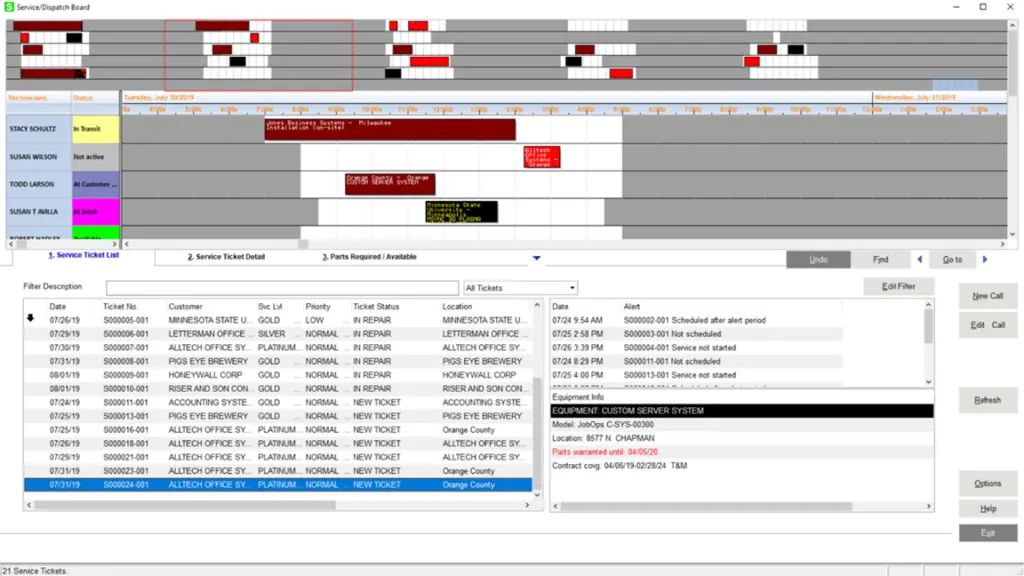
Now, let’s walk through how it works on a day like this.
Scheduling
First, you need to answer the customer with a reasonable estimate of when their tech will arrive.
Your dispatch board gives you an instant, at-a-glance view of everything that matters:
- Technician status: as your techs report in, you can quickly update their status to show who is running late, on lunch, in transit, or not currently available.
- Tech availability: for your tech who’s out sick, mark him as unavailable for the day. Also, look ahead to see each tech’s scheduled hours, so you can plan ahead for the rest of the week and start getting those emergency service calls on the calendar.
- Already scheduled times: includes previously scheduled appointments as well as upcoming preventative maintenance checks, so you don’t double-book and can plan travel and service efficiently.
Using this information, you can see that the customer’s assigned tech is on time and en route to their first call of the day, and the customer is scheduled next.
A glance at your dispatch tool in Sage 100, and you can say with confidence, “He’ll be there this morning.”
Want to see it in action? Schedule a demo of Field Service & Dispatch for Sage 100 today.
Emergency Calls
Back to the board.
You spent the last 15 minutes scheduling work to cover those emergency voicemails from the weekend (some more urgent than others), but you know another call will come in soon.
And… there it is. An actual emergency that needs service today.
Good thing your Field Service & Dispatch tool is built for exactly this. It gives you:
- A “New Call” button: quickly generate and schedule a new service request while you’re on the phone, using a button right on your dashboard.
- Repair part insight: You can view suggested repair parts for similar jobs to understand which parts are typically required. Then, you can see which of your trucks currently have those parts, so you can assign a well-prepared tech.
- Notifications: after you assign the call to the right tech, call details will post to the tech’s Outlook calendar. You can also email the customer to let them know which tech has been assigned and include the service ticket information.
Emergency averted.
End-to-End Insight
Jobs don’t stop at dispatch, and your dispatch tool for Sage 100 shouldn’t stop there either. Field Service & Dispatch helps ease your accounts receivable process as well, with:
- Easy recording of time, materials, and other expenses per job
- Overrides for additional billing needs
- Cost tracking per job or over time, so you can see total part and service profitability
Stay in Control from First Call to Final Invoice
If you’ve ever lost a customer because of a scheduling mix-up or a tech who showed up without the right parts, you already know what’s at stake.
Running a field service operation means juggling schedules, surprises, and customer expectations, all at once. A dispatch tool for Sage 100, like Field Service & Dispatch, gives you the complete visibility and control you need to handle whatever Monday (or any other day) throws at you. From scheduling and emergency dispatch to cost tracking and billing, it’s the end-to-end solution that keeps your team efficient and your customers satisfied.
See how Field Service & Dispatch for Sage 100 can transform the way your team works.