
Summary: Your Sage 100 cost depends on which bundle you need, how many users you have, and a few other variables. This guide helps you start thinking strategically about your Sage 100 ERP cost so you can go into any conversation about it fully informed.
Someone you trust told you to look into Sage 100. So you did. It sounds like a reasonable upgrade from your current setup, and now you’re online, trying to figure out what it costs.
But you can’t find any pricing pages anywhere.
Why Sage 100 Doesn’t Have a Published Price
The cost of Sage 100 depends on your situation and isn’t publicly listed because what you pay varies with your needs. (Our marketers want us to say here that it’s “bespoke,” but we’re not quite sure what that means. We prefer specifics.)
So, specifically, your cost will be based on three questions:
- Which bundle do you choose?
- How many users need access?
- Do you need any add-ons?
Quoting a Sage 100 cost without knowing those details would either mislead you or give you a figure that has nothing to do with your actual situation.
So, let’s talk bundles first.
Start Here: Which Bundle Do You Need?
Sage 100 is sold in three bundles: Essentials, Advanced, and Complete. Understanding which one fits your business is the key to understanding your Sage 100 cost.
Here’s the thing, though. You really only need to read about one of these: the one that fits your company’s needs.
So, let’s treat this like a Choose Your Own Adventure story. After you answer these two questions, you’ll know which bundle to read more about in the next section.
- Do you manage physical inventory?
If the answer is no, start with Essentials; if the answer is yes, you need at least Advanced.
- Do you manufacture or assemble finished goods from component parts?
If the answer is yes, start with Complete; if it’s no, you can probably stick with Advanced.
The Three Sage 100 Bundles
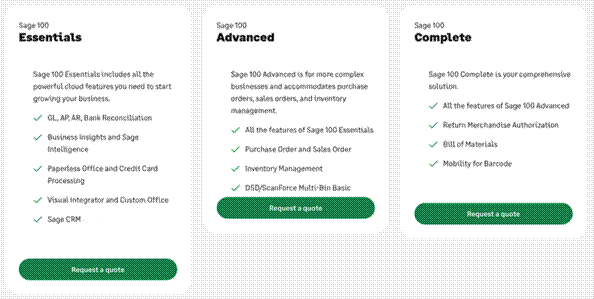
As you probably guessed, each Sage 100 bundle represents a progressively broader set of capabilities. However, rather than thinking of them as “good, better, best” tiers, you should think of them as “the right tools for the job.”
Just like you wouldn’t use a power drill to pound a nail into the wall, you also wouldn’t use Sage 100 Complete to manage the day-to-day financial needs of a small professional services firm. (But you also shouldn’t use a hammer when what you really need is a power drill.)
The bundles are:
Sage 100 Essentials
Essentials is built around core financial management, including GL, AP, AR, and Bank Reconciliation, as well as Business Insights and Sage Intelligence for reporting, Paperless Office, Credit Card Processing, Visual Integrator, and Custom Office. It also includes Sage CRM, which is a nice bonus for the base tier.
If your business requires strong accounting and financial visibility but doesn’t manage physical inventory, Essentials is probably all you need. This makes it a natural fit for professional services firms and general business operations – companies that process transactions and need reliable financials without the complexity of inventory management.
Sage 100 Advanced
Advanced adds inventory and order management on top of Essentials, including Purchase Order and Sales Order processing, Inventory Management, and Multi-Bin to improve warehouse organization.
If your business buys, stocks, and sells physical goods, you’ll need Advanced. It’s a great fit for distributors because Inventory Management tracks what you have, where it is, and what it costs, and the purchase order and sales order functionality automatically tie your buying and selling to your financials.
Sage 100 Complete
Complete adds a targeted set of capabilities on top of Advanced, and it’s geared toward businesses that produce or process physical goods. These tools include Return Merchandise Authorization (RMA), Bill of Materials (BOM), and Mobility for Barcode for warehouse scanning.
Complete is the right fit for businesses with light manufacturing or assembly needs that want to track these processes in their ERP.
What Else Affects Sage 100 ERP Cost?
The bundle is a critical driver of your Sage 100 cost, but once you know which bundle fits your business, a few other variables will come into play in determining your total Sage 100 ERP pricing.
- Number of users
Sage 100 is priced per user, so the more people who need access, the higher your subscription cost. Before getting a quote, think about who at your company needs full access versus who might only need occasional or shared access.
- Add-ons and integrations
The bundles cover a lot, but not everything. (And, honestly, mixing and matching your add-ons is what tailors your system.) Perhaps you need payroll, fixed asset management, sales tax automation, EDI, or any of the many other solutions made by Sage or third-party developers in the Sage ecosystem.
- Hosting and deployment
Sage 100 is traditionally installed on your own in-house server, but if you’d prefer not to manage that infrastructure, you can host it in the cloud. This adds a hosting fee but reduces your internal IT burden.
- Implementation
Getting Sage 100 up and running isn’t a self-install, and implementation (including data migration, configuration, training, and go-live support) is a separate cost from your subscription. That cost will vary significantly depending on your setup’s complexity, your historical data needs, and your partner’s experience. Here’s what a well-run Sage 100 implementation actually looks like.
Get Your Personalized Sage 100 Cost Estimate
Ready to move from generalities to specifics?
As we said, we like specifics, too. So, let’s work together to determine whether Sage 100 is the right match for your needs.
We’ll figure out the bundles and add-ons that make sense for you, and (most importantly), we’ll get you a real number you can count on.