
Continuing the Charge … 2017 User Conference Wrap
Vrakas/Blum Computer Consulting, Inc. (VBCC), hosted its annual User Conference on October 25, 2017. The event was nothing short of a giant success.

Vrakas/Blum Computer Consulting, Inc. (VBCC), hosted its annual User Conference on October 25, 2017. The event was nothing short of a giant success.
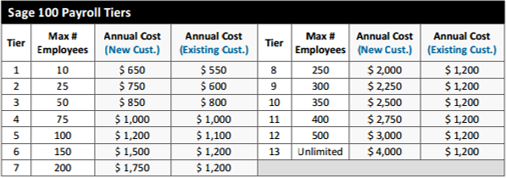
Sage recently announced that beginning in May 2016, Sage 100 customers running the U.S. Payroll Module will see a change in pricing.
If you’ve been holding off on an upgrade to Sage 100 ERP 2015, it’s understandable. There hasn’t been a lot of detail about what’s included in this newest release ‐ until now!

With so many Sage 100 customers that have recently begun using Sage Intelligence Reporting or plan to use it soon as a replacement for FRx

When it comes to business, we all know that errors, manual processes, and redundancy waste valuable time and money. T
At year end, it can be useful to create an archive company using the Copy Company feature. This provides a readily accessible copy of the current year’s data.

Here are just a few tips to keep in mind as you begin year end processing in Sage 100.

By now, all of us have heard about “Customer Relationship Management” (CRM). But not everyone understands what CRM software does or what it means for your business. So let’s go back to basics and explain what CRM is exactly.
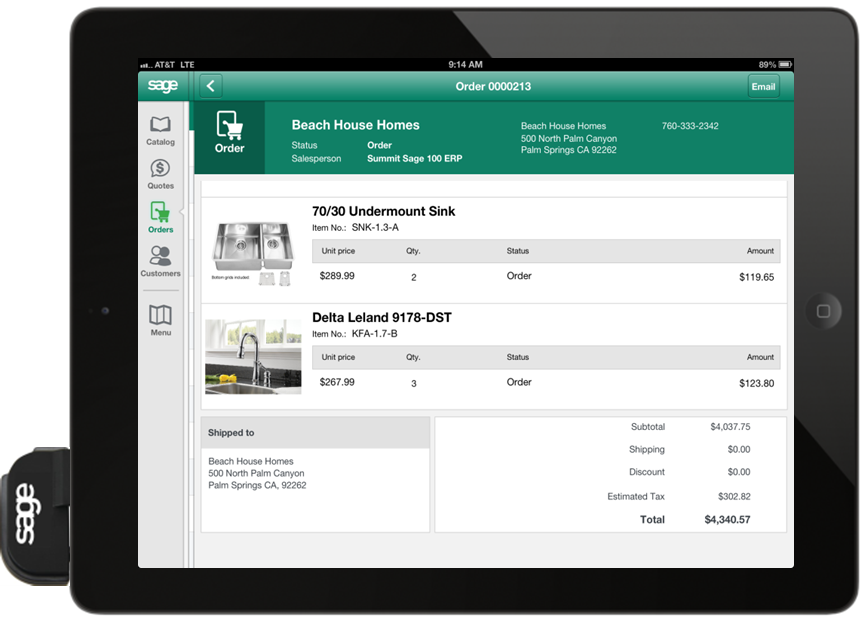
the newest release of Sage 100 ERP includes over 60 enhancements that were submitted and voted on by customers like you using the Sage 100 Ideas Portal.

Sage recently sent out communication warning customers about reports of companies contacting you claiming to represent Sage (but they don’t!).
If you think social media is just for teenagers, think again. More than half of those logging on to social media sites are in their mid-thirties or older.
Traditional media outlets such as newspapers, radio and television, have long served the purpose of delivering one-way messages, like your firm’s advertising. Social media, by contrast, uses web-based platforms to not only deliver your message, but to allow the recipient to participate.
There’s a simple tax truth that direct sellers need to know.
You depend on your agents, or distributors, for growth. But your agents can give you the obligation to collect sales tax in multiple states, without even realizing they’re doing it.
Watch the video below to learn how this works and how best to handle it.